Google Chrome Updates: Embracing Vertical Tabs and Improved Reading Mode
In an exciting move for users, Google Chrome is finally introducing two highly anticipated features: vertical tabs and an enhanced immersive reading mode. While these functionalities have been prevalent in other web browsers for some time, Chrome's late addition improves user navigation and reading experiences on the platform.
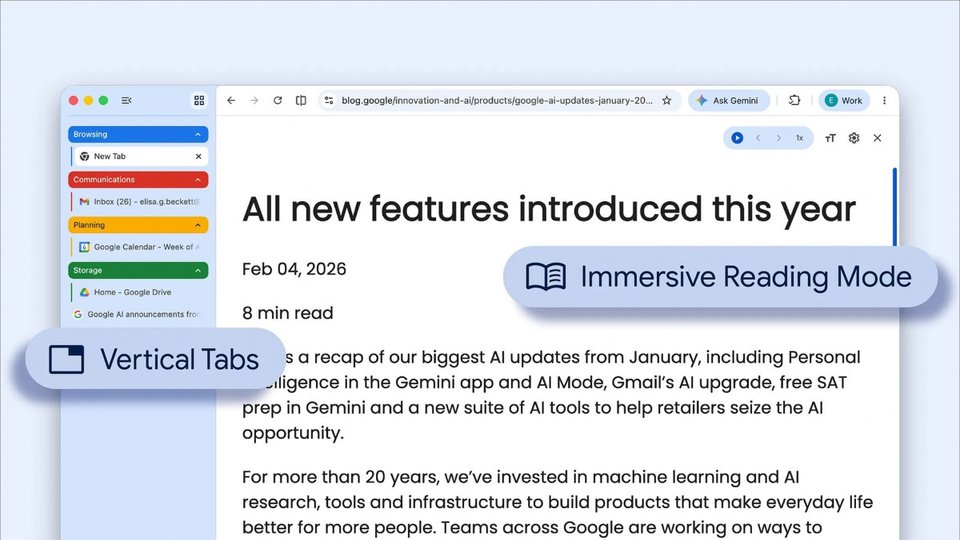
The vertical tabs feature transforms how users manage their open websites. Rather than displaying tabs in a horizontal line across the top of the browser, they will now appear stacked vertically on one side. This change allows users to view many more tabs simultaneously, maximizing the use of screen space. Additionally, the vertical tab column can be collapsed, freeing up more room for viewing content, an essential consideration on widescreen monitors that often provide limited vertical space.
The second enhancement is a significant update to Chrome's existing reading mode. Previous iterations of reading mode operated in a split view, which some users found confusing and inconvenient. The revamped reading mode now opens in full-screen, taking over the entire display and eliminating distractions by covering the original page completely. This approach aligns better with user expectations, making it easier to engage with content without interruptions.
At the time of publication, these features were not yet activated in the current build (147.0.7727.56) of Chrome but are expected to be available shortly, rolling out over the coming days.


