Google Messages Enhances User Experience with New Business Profile Design
The latest update to Google Messages introduces a revamped business profile interface, aiming to streamline interactions between users and businesses. This change is part of Google's continuous efforts to improve the communication experience for Android users, ensuring that both personal and business profiles maintain a consistent and user-friendly design.
Google is enhancing its Google Messages app by implementing a new way for users to interact with business contacts through Rich Communication Services (RCS). According to Android Authority, the latest version of Google Messages, messages.android_20260220_01_RC00.phone.openbeta_dynamic, introduces this feature, mirroring the familiar style of personal profiles for business profiles.
Improving the User Experience
By aligning the interfaces of personal and business profiles, Google aims to deliver a seamless user experience. The traditional business profile, which appears when a business reaches out to users via RCS, previously comprised two distinct views: Info and Options. Users can easily switch between these tabs to view relevant information.
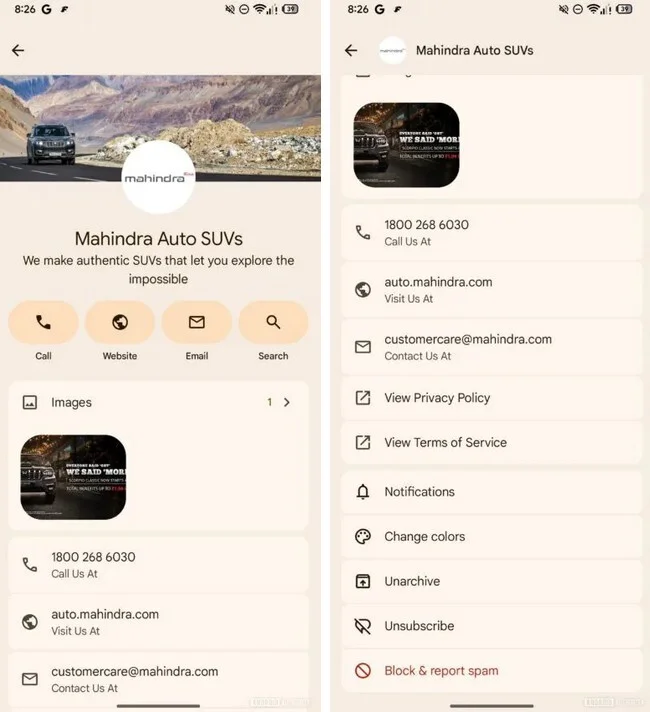
The updated business profile in Google Messages mirrors the design of the personal profile. | Image by Android Authority
The revamped profile now features the business logo prominently at the top, along with essential business information. Users will find three icons for quick access: one for making a phone call, another for visiting the business's website, and a third for sending an email. The Info view displays the phone number, website, and email address, while the Options view allows users to manage their interaction with the business through options like Block and report spam, View Privacy Policy, and View Terms of Service.
A Unified Interface for Business Engagement
The redesigned business profile showcases the company logo and name, along with a description of the business. It includes four interactive "pills" that facilitate direct actions such as calling the business, visiting their website, and sending an email. A fourth "pill" is available for conducting a search related to the business. Users can also see an image associated with the company, a “Call us at” phone number, a “Visit us at” web address, and a “Contact us at” email address.
The new interface offers two pages, which users can navigate using an arrow next to the page number. The second page contains the company's phone number, website, and email details, along with options to View Privacy Policy, Notifications, Change colors, Unarchive, Unsubscribe, and Block & report spam.
If you haven’t yet downloaded Google Messages on your Android phone, you can easily install it from the Google Play Store by tapping here.


