Revolutionizing Mobile Gaming: How to Run Steam PC Games on Your Android Device
As the gaming landscape continues to evolve, we find ourselves standing at the intersection of technology and creativity. No longer confined to traditional consoles or PCs, mobile gaming has surged into the spotlight, transforming the way we play. Imagine diving into your favorite Steam games right from your Android device. Thanks to innovative solutions like Winlator and GameHub, this dream is now a reality. In this article, we'll explore how to unleash the power of PC gaming on your phone or tablet and what makes this transition possible.
The gaming revolution we are witnessing is not about microtransactions or pay-to-win mechanics—it's about harnessing technology to enhance our gaming experiences. Traditionally, running Windows applications on non-Windows platforms has been a challenge, but projects like Wine have paved the way for gaming on platforms like Android, which is rooted in Linux.
In 2018, Valve introduced Proton, a specialized fork of Wine designed to enhance gaming compatibility and performance for Linux users. Fast forward to 2023, the introduction of Winlator—an Android app that combines various groundbreaking technologies—further bridges the gap between PC gaming and mobile devices.
Winlator: A Game Changer for Mobile Gaming
Winlator's user-friendly interface and customizable input settings allow players to configure touch controls to their liking, making it easier than ever to play traditional PC games on the go.

Doom Eternal running on my phone | Image by PhoneArena
Modern Adaptations: GameHub and its Capabilities
GameHub further enhances the gaming experience by integrating technologies from Pluvia, an open-source Steam client, enabling users to effortlessly access their Steam library and play a range of PC titles on Android. Thanks to various updating forks of Winlator, by 2024, running iconic games from 1997 to 2005 on devices with Snapdragon processors is not just feasible; it's a thrilling experience!
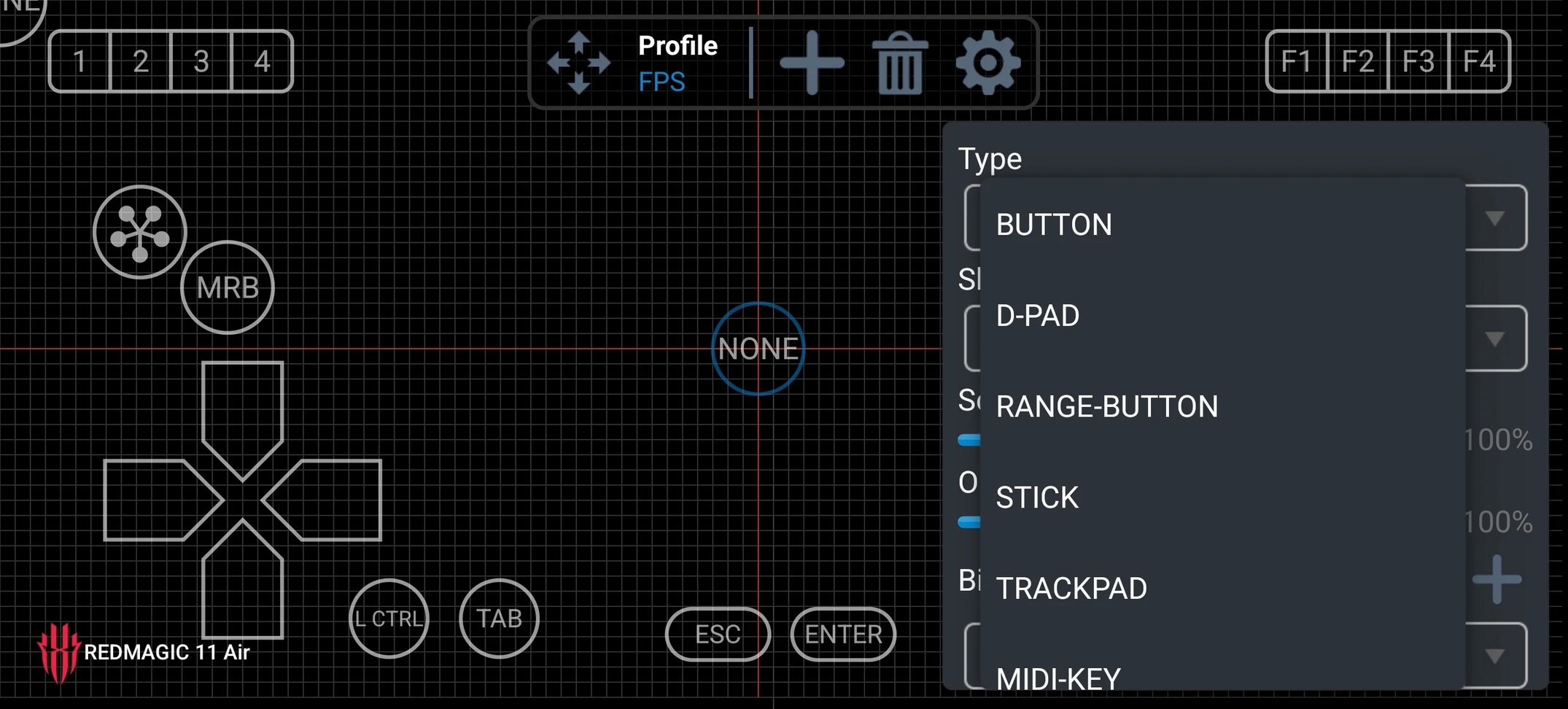
Touch input customization in Winlator | Image by PhoneArena
Increasing Compatibility and Performance
Players can now run impressive, modern games on their mobile devices with a compatibility rate of over 50% on recent Snapdragon chipsets. The progress made in touch control customization is significant, allowing gamers to enjoy their favorite titles anywhere.
GameNative UI and RTS controls | Image by PhoneArena
Coping with Heat and Performance Issues
While the excitement of playing PC games on mobile comes with challenges—such as heat generation and potential performance throttling—using external cooling solutions can alleviate these issues, ensuring a smooth gaming experience.
Phone coolers help you keep temperatures in check and avoid throttling. | Image by Amazon and GameSir
Looking Ahead: The Future of Mobile Gaming
The present is incredibly exciting for mobile gaming enthusiasts. With ongoing advancements, we can anticipate even greater improvements in the next few years, potentially transforming our Android phones into portable gaming powerhouses.


