Google Photos is about to introduce an exciting new feature called "Touch Up" that allows users to enhance facial features in their photos with precision and ease. This AI-powered tool lets you fine-tune specific areas of a face, making it a handy addition for anyone who wants to subtly improve their pictures without needing advanced photo editing skills.
Introducing Touch Up: Your Personal Photo Retouching Assistant
Hidden within the recent update of Google Photos (version 7.56.0.839465534) is a powerful new tool named Touch Up. Although users with versions prior to 7.56, such as 7.55 on Pixel 6 Pro and iPhone 15 Pro Max, haven’t yet received it, the rollout appears imminent.
Once available, Touch Up will offer six retouching options to enhance faces:
- Smooth
- Under Eyes
- Irises
- Teeth
- Eyebrows
- Lips
Each option comes with a slider, allowing users to control the intensity of the adjustments with granular precision. When your edits are complete, simply tap “save” to apply the changes.
Individual Face Editing Even in Group Photos
Perhaps one of the most impressive aspects of Touch Up is its ability to target individual faces in group shots. The app automatically detects up to six faces per photo and enables you to apply unique touch-ups to each person’s features. Whether one subject requires brighter teeth while another needs eyebrow refinement, Touch Up treats every face separately rather than applying a universal filter.
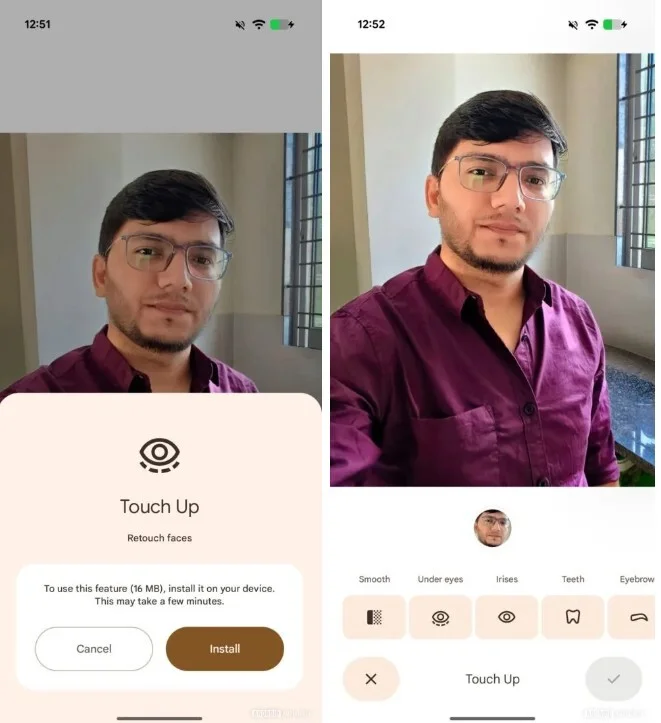
Screenshots showcase how the Touch Up feature will appear in Google Photos. | Image credit: Android Authority
How to Access and Use Touch Up
To start using Touch Up, open a photo in Google Photos and navigate to the "Actions" tab within the editor. The first time you access the feature, a 16MB machine learning model will download to your device to power the AI enhancements.
Once installed, you can easily select each face and adjust any of the six retouching settings to your preference.
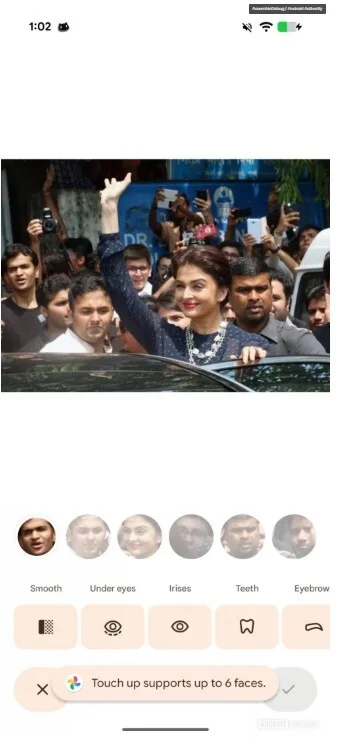
Touch Up allows refinements on up to six faces individually, even in group photos. | Image credit: Android Authority
Ethical Considerations and Sharing Edited Photos
While Touch Up offers convenient ways to improve photo aesthetics, it also brings up questions of consent. Some people prefer to be shown in photos as they are, without artificial modifications. Others welcome subtle enhancements.
If you plan to share retouched photos with your subjects, consider informing them about any adjustments made to their appearance. Transparency could help maintain trust and respect.
Will You Use Touch Up?
Current Results:
- Sure. Why not? - 42.86%
- No. I'm not a plastic surgeon - 42.86%
- Perhaps. I need to see examples - 14.29%
If you don’t have Google Photos installed yet, iPhone users can get it from the App Store and Android users from the Play Store.
Notably, Google Camera has long offered facial enhancements, and with Touch Up, Google Photos will soon provide even more sophisticated tools for perfecting your portraits.




