Google is rolling out a new AI-powered notification summaries feature to many Pixel users, specifically on Pixel 9 and Pixel 10 models. This new functionality, similar to one previously introduced by Apple on the iPhone, condenses lengthy messages into digestible summaries, helping users quickly grasp the essence of a conversation without opening every notification.
The Rise and Challenges of AI-Generated Notification Summaries
Apple initially pioneered AI-generated notification summaries for iPhone users, aiming to save time by providing concise overviews of longer messages. However, this feature soon faced criticism when some AI-generated summaries inadvertently transformed legitimate news stories into misleading or false narratives. For instance, a BBC report concerning Luigi Mangione, accused of murder in December 2024, was inaccurately summarized with a false claim that "Luigi Mangione shoots himself." The BBC expressed concern over trust and accuracy, emphasizing the importance of reliability in journalism.
To improve transparency, Apple later updated the feature to display AI summaries entirely in italics, making it clear which notifications were computer-generated.
Google Introduces AI Summaries in the Pixel 9 and 10 Series
Following Apple's lead, Google launched its own AI Summaries feature in the November 2025 Pixel Drop update, available on Pixel 9 and later models — excluding the Pixel 9a. This feature works across messaging platforms like Google Messages and WhatsApp. When enabled, it highlights the key points of longer messages in user notifications, allowing quick scanning without opening each message.
Currently, AI Summaries supports only English and activates exclusively for lengthy messages, ignoring messages composed solely of emojis.
Customizing and Troubleshooting AI Summaries
Users can activate AI Summaries by navigating to Settings > Notifications > Notifications Summary and toggling the feature on. Summarized messages are marked with the Gemini AI sparkle icon, which distinguishes AI-generated content. Additionally, users have control over which apps receive summarized notifications via an exclusion list accessible under "Manage Apps" in the same menu.
If AI Summaries do not display, ensure that battery saver mode is disabled (as it disables AI Summaries), the device is connected to a network, and consider restarting the phone.
Will Older Pixels Receive AI Summaries?
At present, Google does not appear to be extending this feature to older Pixel devices, including the Pixel 6, Pixel 7, or Pixel 8 series. However, past updates have occasionally brought newer features to older models, so future support, while uncertain, cannot be completely dismissed.
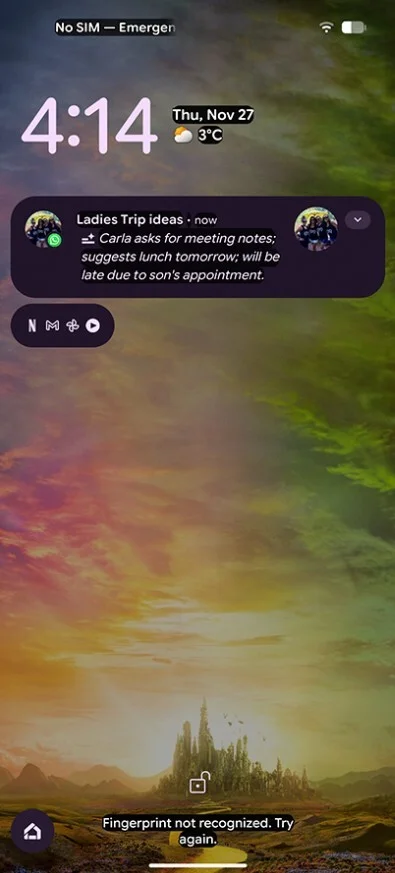
Example of a Pixel AI Summary. | Image credit – Android Central
Conclusion
Google’s AI Summaries bring a convenient way for Pixel users to navigate conversations more efficiently, echoing a concept Apple introduced years earlier. While there are limitations and ongoing challenges regarding accuracy and availability, this feature has the potential to save users valuable time in managing their messages daily.




