Google has unveiled a new power-saving mode in Google Maps aimed at reducing battery drain during navigation, but for now, this innovative feature is exclusively available on the Pixel 10 series. Navigation apps are notorious for consuming significant battery life due to constant GPS tracking, internet use, and the screen staying awake throughout your journey.
Key Points to Know About the Power-Saving Mode
Whether you use Google Maps, Apple Maps, or Waze, navigation apps tend to heavily tax your smartphone’s battery. Google’s newly introduced power-saving mode within Google Maps helps mitigate this by using a simplified map interface and leveraging the phone’s always-on display capabilities.
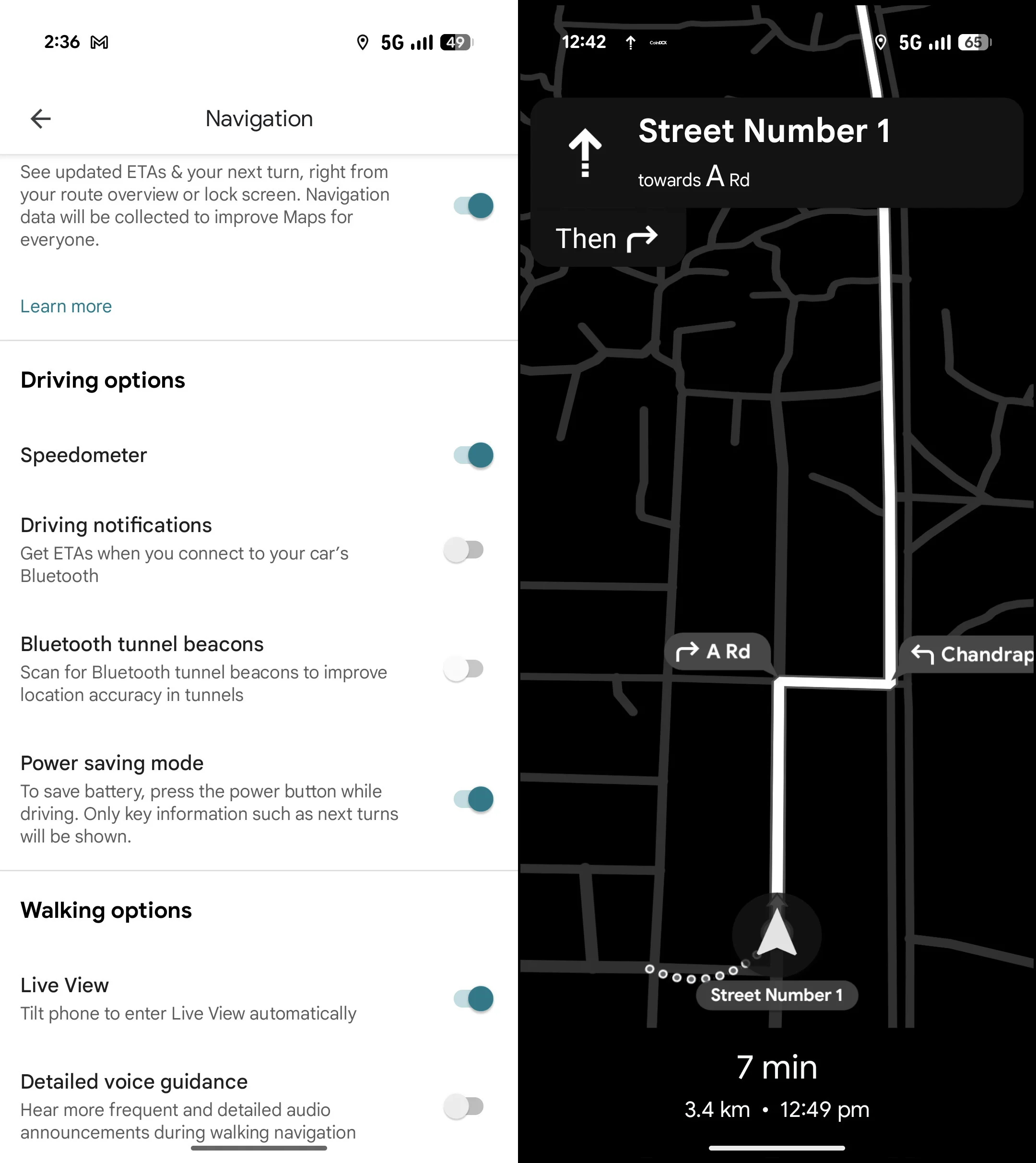
- Open Google Maps and tap your profile icon in the top-right corner.
- Go to Settings and select Navigation.
- Within Driving Options, toggle on Power Saving Mode.
- Start navigation, then press the power button to activate the power-saving interface.
Once activated, your phone will display a minimalist, low-power map on the lock screen showing essential details such as upcoming turns, drastically reducing screen brightness, refresh rate, and switching to a monochrome theme to conserve battery.
Additional Details and Limitations
This new mode utilizes the Min Mode on always-on displays, designed specifically to consume less energy. However, there are a couple of limitations to note:
- The power-saving mode works only in portrait orientation. Trying to switch to landscape will display a prompt stating that landscape is unavailable while power saving is enabled.
- The feature is presently exclusive to driving navigation. It does not support other travel modes such as walking, biking, or jogging, which could also benefit from battery savings.
Why This Feature Matters
Google Maps’ new power-saving mode is a welcome addition for users embarking on long drives, helping extend battery life without needing to rely solely on external chargers. Other popular navigation apps like Waze and Apple Maps still lack such built-in power-saving functionality, although enabling the smartphone’s system-level low-power mode or using offline maps can somewhat help conserve battery.
Offline maps are another practical option to save power since they remove the need for continuous internet access while still requiring GPS and active screen time.




