Android 16 QPR2 is on the horizon, and Pixel users can soon experience a refreshed search bar design in the Pixel Launcher. This update enhances the search bar's appearance by incorporating brighter, dynamic colors drawn from your wallpaper, giving both light and dark themes a more vibrant and modern feel. Although it’s a subtle change, it highlights Google's commitment to refining every detail of the Pixel experience.
A Brighter, Dynamic Search Bar in Android 16 QPR2
Leveraging the Dynamic Color feature, the Pixel Launcher search bar now features a more pronounced and vivid background color that reflects the primary hues of your wallpaper. In light mode, the Google Search pill – which you swipe up to open the launcher – displays distinct containers with sharper visibility. The larger container on the left houses the Google “G” icon, with the microphone situated about three-quarters in, and the Google Lens icon on the far right. These elements contrast beautifully with the brighter backgrounds.
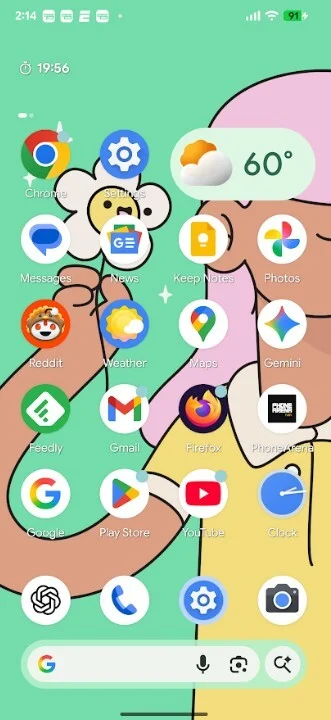
Additionally, there is a smaller round container designed like a magnifying glass embellished with a Gemini "sparkle." Tapping this icon launches the AI mode, granting quick access to Google's AI-powered search capabilities. The icons visually pop against the white background, making them easy to identify and interact with.
Updated Iconography and Dark Theme Adjustments
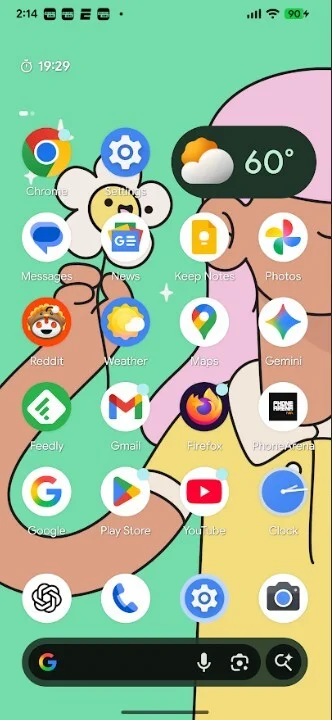
When switching to dark mode, the vibrant color surrounding the search bar pill adjusts to a deeper tone derived from your wallpaper, maintaining better visibility without being overpowering. This is notably brighter and more striking than in the previous QPR1 release of Android 16. The search bar at the top of the Pixel Launcher grid has also seen icon updates: the microphone, AI Mode, and Lens icons have been enlarged for better accessibility and a modernized look.
Joining the Android 16 QPR2 Beta Program
If you’re eager to try these changes immediately, Google’s Beta program for Android 16 QPR2 is open to Pixel users. Before enrolling, ensure your device is backed up and be aware that Beta software may have some bugs—though QPR Betas tend to be stable compared to general Android Betas.
To join, visit google.com/android/beta, then tap “View your eligible devices.” Select your Pixel and opt into the QPR2 Beta program. Once enrolled, you’ll receive the update notification—simply navigate to Settings > System > Software updates > System update to install.
Because the stable release is just weeks away, consider whether trying the Beta is worth it, as leaving the Beta early requires a device wipe. Once stable, exiting the Beta will be straightforward without penalties.
Minor Yet Meaningful Visual Refinements
While this update isn't a major overhaul, it underscores Google's meticulous approach to enhancing Android's user interface by refining small elements. The refreshed search bar adds a splash of color and clarity that elevates the Pixel Launcher’s overall aesthetics.




