Save Time and Space with Google Photos’ New AI-Driven Photo Stacking Feature
Google has rolled out an exciting new feature in Google Photos designed to help users organize their photo libraries while freeing up valuable storage space. The innovative tool automatically groups similar photos into stacks, allowing you to easily select your favorite shot and delete duplicates with minimal effort. If you prefer, the AI can even choose the best picture from each stack for you, deleting the rest in a single tap. This update aims to streamline your photo gallery and optimize your phone’s storage in one seamless experience.
Your Opinion Matters
This stacking functionality has drawn comparisons to Pixel’s exclusive Top Shot feature, which captures multiple frames around the moment you snap a photo and then selects the best one using AI. While Top Shot remains limited to Pixel devices, Google Photos’ new stacking tool is planned for broader access, including Android smartphones and possibly iPhones. This move reflects Google's broader efforts to integrate AI across its suite of apps.

Stay updated with the latest iOS news by subscribing below:
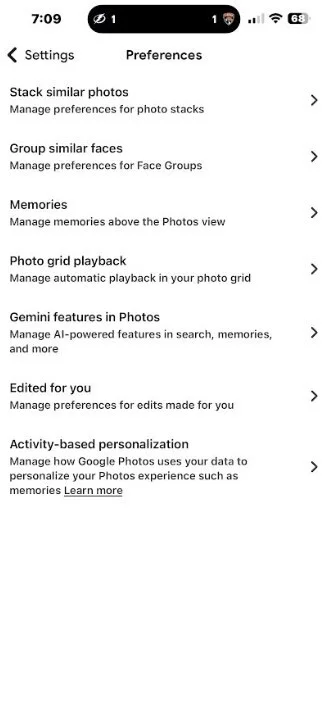
Photo stacking in Google Photos for Android will appear on this screen. | Image credit - PhoneArena
How to Check if You Have the Photo Stacking Feature
To find out if the stacking update is available on your device, open Google Photos, tap your profile icon in the top-right corner, then go to Google Photos Settings > Preferences. If you see an option called "Group similar photos", simply enable it to start using the feature.
Currently, Google plans to release this feature primarily for Android users first. While some users hesitate to delete any photos due to sentimental reasons or superstitions, this stacking tool makes organizing your gallery easier without overwhelming you with repetitive images. What will you do once this handy feature arrives on your phone?
Ultimately, photo stacking not only cleans up your gallery interface but also saves time scrolling through duplicates, all while freeing up extra storage space on your device.
Travel Smart with Nomad eSIM – Enjoy 25% Off
Get 25% off eSIM data-only plans with global coverage. Use code IPHONE25. Sign-up required.
This offer is not available in your area.


