Google Play Store Introduces "Where to Watch" Card to Simplify Streaming Searches
For those who frequently stream video content, the Google Play Store has rolled out a handy new feature designed to make it easier to find where your favorite movies and TV shows are available. The “Where to Watch” card appears when searching for a title, offering an overview of streaming platforms that carry it.
To access this feature, open the Play Store app and tap the Search tab—iconized by a magnifying glass. Enter the name of the movie or TV show you're interested in streaming, renting, or purchasing. You'll then see the “Where to Watch” card showing all the platforms that offer the content. While still gradually rolling out and not yet available on all devices (such as the Pixel 6 Pro running Android 16 QPR2 Beta 3.3), Google’s addition promises to streamline content discovery.
One example showcased by Google involves the hit HBO series The Last of Us. The card reveals that you can stream the show on HBO Max, watch it live on YouTube TV, or stream it via Prime Video. Pricing details are currently omitted, likely due to the complexities arising from varied subscription plans across services.
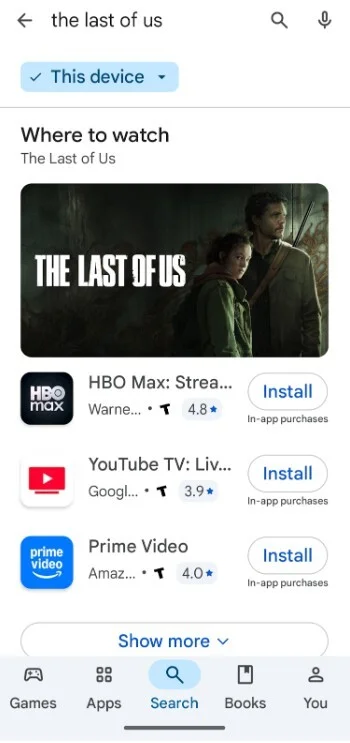
Each streaming app listed on the card includes a direct install button for Android users, facilitating quick access to install and watch through their preferred platform. The card also displays ratings for each service's version of the show or movie, which can vary considerably. For example, The Last of Us scores 4.8 stars on HBO Max, 3.9 on YouTube TV, and 4.0 on Prime Video. While individual platform ratings can be helpful, some might prefer an aggregated rating from a trusted source like IMDb for consistency.
Is This Feature Useful? A Quick Community Poll
According to a small poll, 66.67% of voters find this feature genuinely useful, while 33.33% prefer asking AI assistants for similar information. The vote count stands at 6 participants.
Since the Google Play Store is primarily an Android app marketplace, “Where to Watch” focuses on helping users discover and install streaming apps. It currently does not show broadcast schedules or include reminder notifications, features that could enhance its utility in the future.
Looking for More? The TV Guide App Offers a More Comprehensive Experience
While the Play Store’s new feature is a great start, if you want a more robust tool for streaming searches and TV listings, consider the TV Guide app available for both iOS and Android. Formerly a magazine with a peak circulation of 20 million, TV Guide now thrives as a mobile app providing detailed streaming platform links as well as broadcast and cable TV schedules in your area.
Unlike the Play Store’s “Where to Watch” card, the TV Guide app directs you straight to the platform’s website where you can sign in or subscribe without needing to install numerous apps. This convenience, along with localized TV listings, makes it a valuable alternative for managing your entertainment choices.
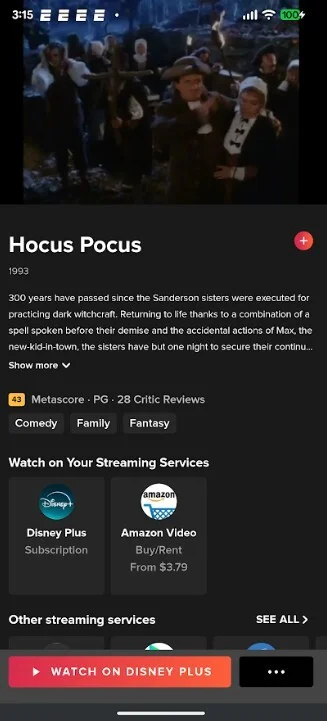
In summary, Google’s “Where to Watch” card could prove useful on cozy nights when you want to quickly identify which streaming service carries that specific movie or show you’re craving — no more jumping from app to app or website to website.




