Discover and Share Trendy GIFs Easily with Gboard
Gboard's latest feature update includes a new button that allows users to find and send trendy and topical GIFs with just a tap. The button, represented by an upward pointing trendline, appears in the GIF menu's search bar and provides quick access to the most popular GIFs sourced from Tenor.
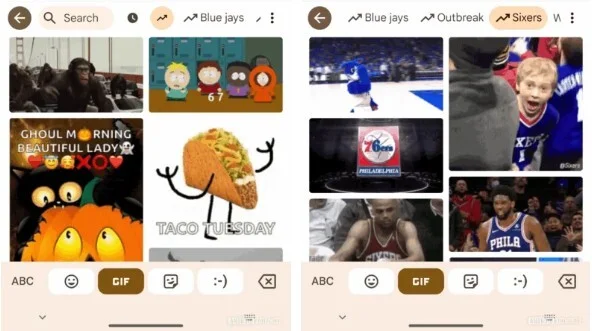
The curated list of trending GIFs ensures that your messages stay relevant and engaging. From holiday celebrations to sports events, Gboard's new feature helps you communicate with flair and style.
Experience Faster Typing with Gboard's Flick Feature
In addition to trendy GIFs, Gboard introduces the Flick feature that enhances typing speed and efficiency. By swiping down on keys, users can access symbols and numbers seamlessly, optimizing the typing experience on mobile devices.
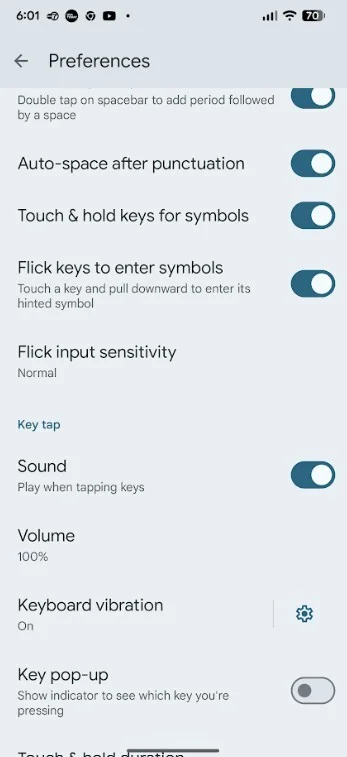
Mastering the Flick feature may take some practice, but once perfected, it can significantly improve your typing capabilities on Gboard. Adjust the sensitivity settings to suit your preferences and enjoy a customized typing experience.
Explore the Latest Features and AI Enhancements on Gboard
Aside from GIF and Flick features, Gboard offers AI-powered functionalities such as automatic proofreading, grammar correction, and tone adjustment. Users can customize font sizes, remove unnecessary keys for a clean layout, and personalize their messaging style with ease.




