Apple has recently released the fifth developer beta for iOS 26, showcasing some interesting changes that users need to check out. This beta release comes just weeks before the official iOS 26 launch and includes various updates and enhancements. Developers can now access the beta build number 23A5308g by subscribing to the iOS Beta Software Program and updating their devices in the Settings menu. Let's dive into the new features and improvements found in this latest beta release.
The iOS 26 developer beta 5 introduces an Apple Watch-related image with a display resolution of 422 x 514, potentially hinting at upcoming changes in the Apple Watch Ultra 3. Additionally, there are new splash screens for apps like Apple Music, Journal, and Notes, along with notifications for Adaptive Power adjustments to extend battery life. The beta also includes a new AirDrop icon, revamped Control Center boxes, and a redesigned share sheet. Users can now enjoy a fresh look and feel with liquid glass effects on the home screen and Camera app.
Users have the option to switch between the new mode switching tab and the Classic Mode Switching tab in the Camera app for a personalized experience. As we approach the stable release of iOS 26, the frequency of beta updates may increase, bringing users closer to the full version launch. Stay tuned for more exciting developments as iOS 26 continues to evolve with each beta release.
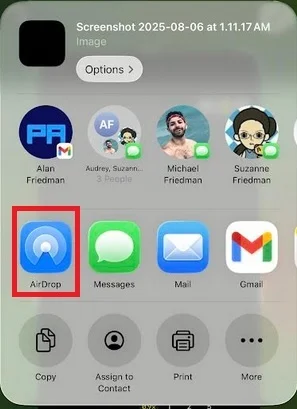
New share sheet and AirPlay icon (circled in red). | Image credit-PhoneArena
Also spotted in the latest iOS 26 beta release:
- A new AirDrop icon.
- A new bouncy look to the boxes in the Control Center when you swipe down on the screen.
- A new share sheet.
- Liquid glass look for the "-" when you are editing the home screen.
If the new mode switching at the bottom of the Photo app isn't your cup of tea, you can use the new Classic Mode Switching tab to return to the older, or Classic, way to choose between Photos and Video on the Camera app.
Since we are getting closer to the release of the stable iOS 26, the time between beta releases could shrink significantly.




