Rejoice as Chrome for Android has rolled out a game-changing feature in version 138 of the app. Users now have the option to relocate the address bar to the bottom of the screen, making navigation more convenient, especially for those with larger smartphones. This feature was initially proposed by Google in 2016 but was shelved until now, finally catching up with the iOS version which introduced the same functionality for iPhone users in 2023.
Would you prefer the Chrome address bar at the bottom?
Yes, it's more comfortable at the bottom.
71.43%
No, I prefer it at the top.
0%
I'll try both before deciding.
28.57%
I prefer not to make the change.
0%
Votes: 7
Back to Voting
Google introduced the option for iPhone users in response to Safari's similar feature from Apple in 2021. To enable the bottom address bar on Chrome for Android, open the app, tap the three-dot icon, go to Settings > Address bar, and toggle on "Bottom." If you don't see this option, ensure you're on version 138 or higher of the Chrome app on your Android device.
Find the Chrome version on your phone by going to Settings > Apps > Chrome. Check the version number at the bottom of the page; if it's 138 or above, you're good to go. If not, try forcing the stop on the app a couple of times until the bottom bar option appears.
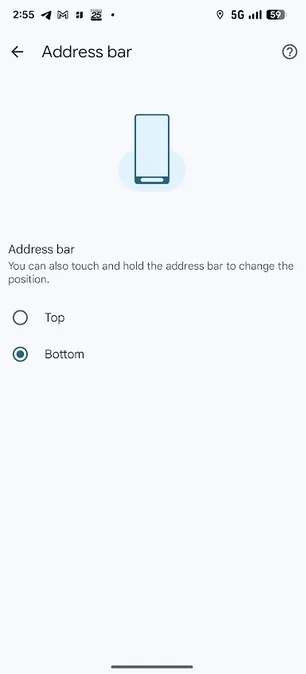
How to move the Chrome address bar from the top to the bottom on Android. | Image credit: PhoneArena
If Chrome isn't pre-installed on your Android device, you can download it from the Play Store. Give the new bottom address bar a try and see if it enhances your browsing experience.

Don't miss out on Surfshark VPN at over 50% off with 3 extra months free!
Secure your connection with this fantastic offer, and remember, we may earn a commission from purchases made.
Check Out The Offer




