If there's one feature that Pixel users adore, it's the Now Playing feature that appears on the lock screen and Always-On Display. This feature automatically identifies the songs playing nearby and provides the name of the song and artist. To activate this feature on a new Pixel device, simply go to Settings > Sound & vibration > Now Playing and toggle on "Identify songs playing nearby."
Now Playing utilizes a song database stored on Pixel devices, ensuring that no audio or background conversations are shared with Google. The music recognition feature prioritizes user privacy by employing privacy-preserving analytics. Compared to other music recognition apps like Shazam, Now Playing on Pixel devices outshines in performance.
Will the addition of album art enhance the Now Playing feature?
What sets the Pixel line apart is Google's commitment to enhancing user experience. Continuously updating features like Now Playing to make them more user-friendly is a testament to this. The convenience offered by the Pixel devices, especially with the Now Playing feature, simplifies the way users interact with their phones.

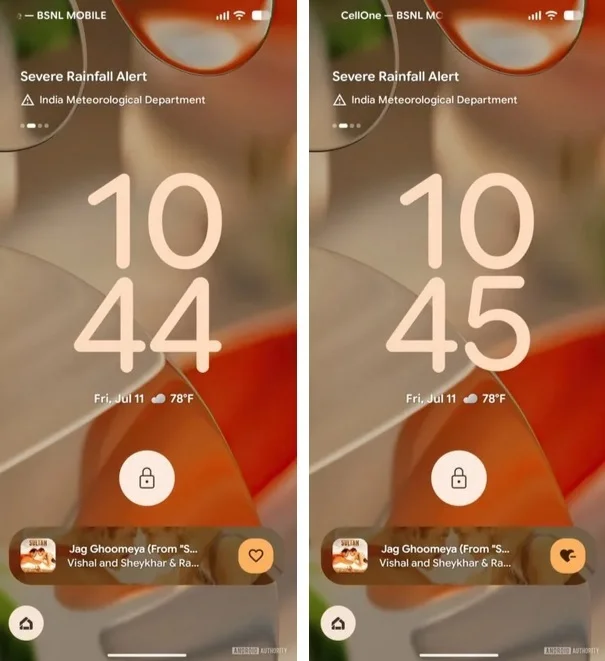
Recently, a system update for Android devices revealed that tapping on a song in Now Playing will display a bar with the song title, artist name, and album art. This new feature enhances the user experience by providing a visually appealing way to interact with the recognized songs.
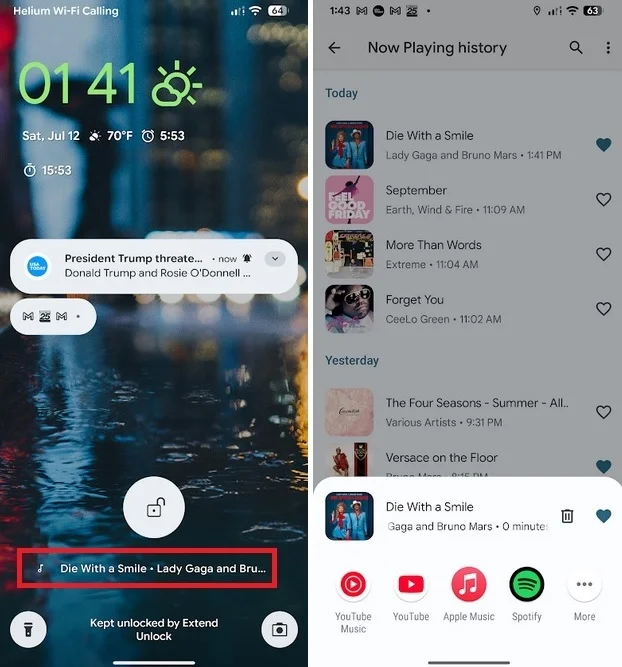
This update aims to make the Now Playing experience more immersive and engaging for Pixel users. By incorporating album art into the recognition process, Google continues to innovate and improve the functionality of its devices.



