Image credit — Lex Photography
Apple is exploring innovative ways to enhance user interaction with its Mac computers, and a recent patented idea could transform the functionality of the Magic Mouse. The approved patent reveals Apple's concept of a mouse capable of detecting gestures in the air around it, not just on its surface. This advancement could potentially enable users to control their MacBooks by making hand or finger gestures near the mouse, similar to the interaction experience with the Apple Vision Pro.How would it work?
The patent, titled "Electronic devices with extended input-output capabilities," outlines the potential features of a future Magic Mouse equipped with various sensors. These include optical sensors using LEDs or lasers, capacitive sensors to detect proximity, and even cameras, both regular and infrared. These sensors would collaborate to interpret three-dimensional hand movements in the space surrounding the mouse. The patent also suggests the mouse could project virtual images such as buttons or icons onto the desk surface, allowing users to interact with them through gestures.
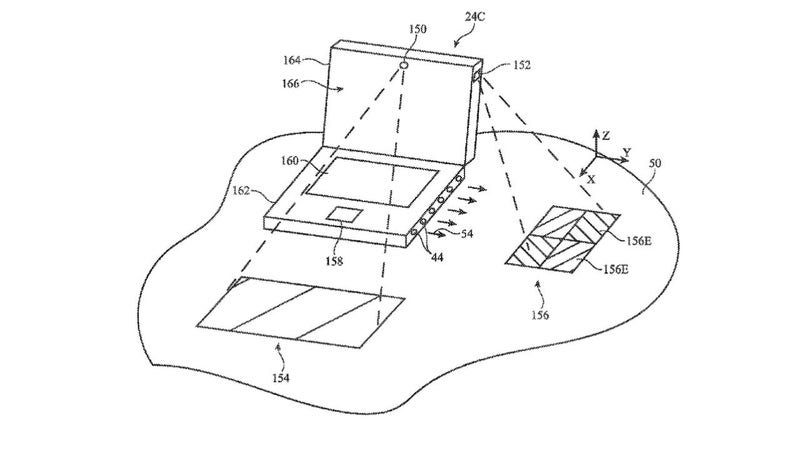
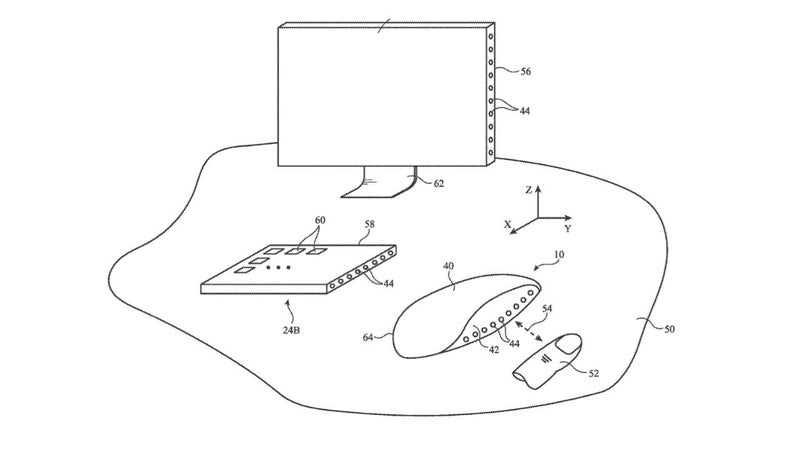
Patent illustrations of a mouse that could project an image for the user to interact with. | Images credit —AppleInsider
More than just a mouse
Apple's patents often encompass multiple applications. While the primary focus is on a novel mouse design, the technology could be extended to various devices like trackpads, laptops, monitors, tablets, and even phones. Additionally, the patent hints at the possibility of integrating gesture detection into furniture pieces like tables or desks, offering a futuristic control experience for users.




