Google TV Streamer is now integrated into the Chromecast with Google TV, breathing new life into the streaming dongle. Users can now conveniently access smart home controls directly from their TVs, thanks to this feature addition. The inclusion of Google TV Streamer showcases the continued evolution and relevance of the Chromecast device, particularly following the Android 14 rollout earlier this year. Let's explore the significance of this latest enhancement for Chromecast users.
Exploring the Home Panel Feature
The Home Panel serves as a convenient tool for managing connected home devices without the need to rely on additional gadgets like phones or tablets. It replicates the "Favorites" tab in the Google Home app, allowing users to easily adjust smart lights, monitor security cameras, regulate thermostats, and interact with other compatible smart devices directly from their TV screens. Accessing the Home Panel is effortless, as it can be found in the Quick Settings menu or by simply long-pressing the home button on the Chromecast remote.
The introduction of the Home Panel initially debuted on newer Google TV hardware and was later extended to the Google Home public preview program. Following its appearance on some smart TVs last October, Google is now rolling out the feature to the original Chromecast with Google TV and potentially other devices running Google TV operating system.
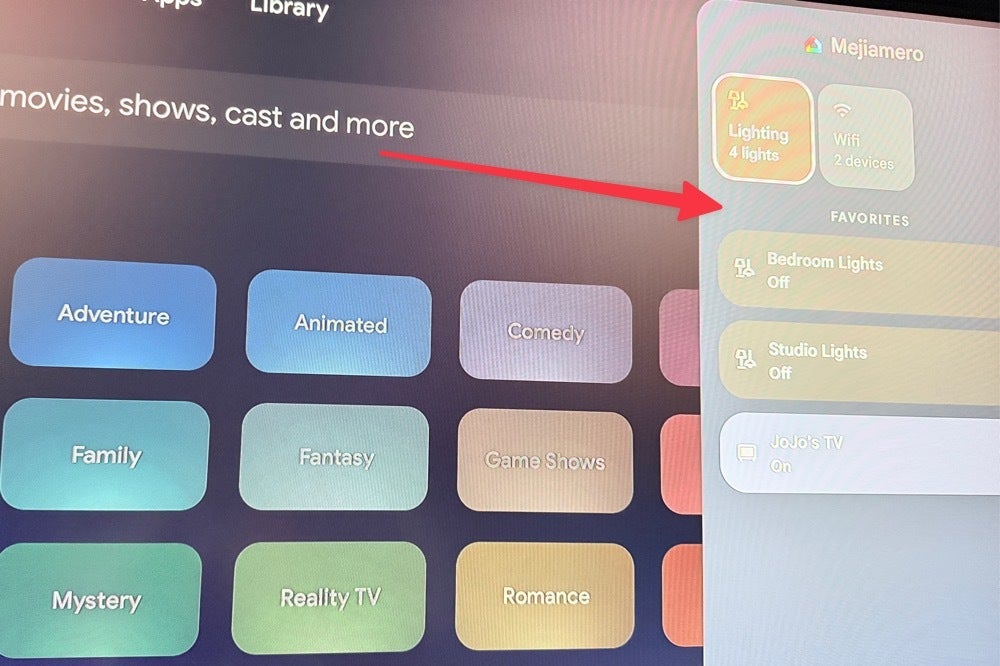
The Home Panel feature in action on a TV utilizing the original Chromecast with Google TV streaming dongle. | Image credit — PhoneArena
To make use of the Home Panel feature, users must meet certain requirements:
- Be part of a "Home" setup in the Google Home app as either the owner or a member.
- Have the Google TV operating in standard mode (not "apps-only" or "basic" mode).
- Include at least one smart home device (besides the TV) in the Google Home app.




