Google Keep for Android Introduces Quick Text Note Creation Feature
The Google Keep app, a highly functional tool for note-taking and organization, has become a staple for smartphone users. Whether you need to jot down ideas, create shopping lists, or draft drawing sketches, this app is available on both Google Play Store for Android and App Store for iOS. With its versatility, Google Keep is integral to keeping your thoughts in order across any platform.
A new update is currently being rolled out to the Android version of Google Keep, adding a much-anticipated feature: a toggle switch that allows users to default to creating text notes. By simply tapping the "plus" button in the app's corner, a fresh blank note will be ready for you to write on. However, to utilize this feature, users must enable the "Create text notes by default" toggle, which is initially turned off.
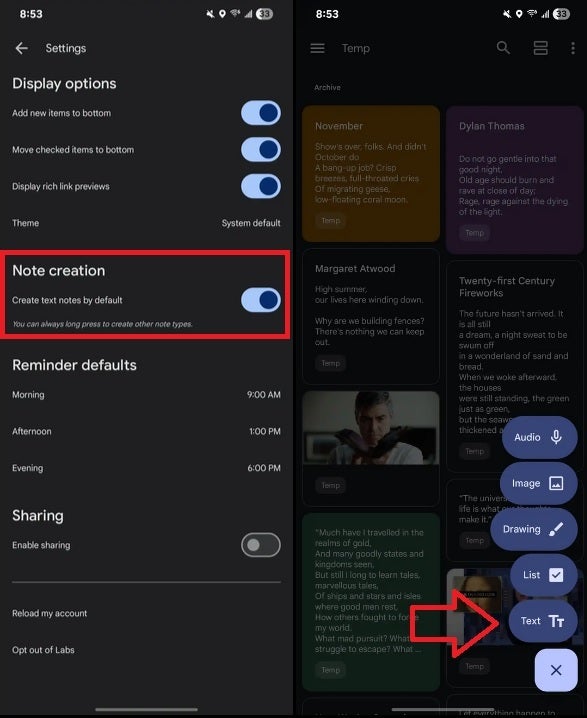
Enabling this feature is straightforward. Open the Google Keep app, tap on the hamburger icon on the left side of the search bar at the top, then select 'Settings’. Under the 'Note creation’ heading, toggle on the "Create text notes by default." When you’re set to compose a note, simply tap the plus sign in the lower right corner, and a template for a text note will appear ready for your typing.

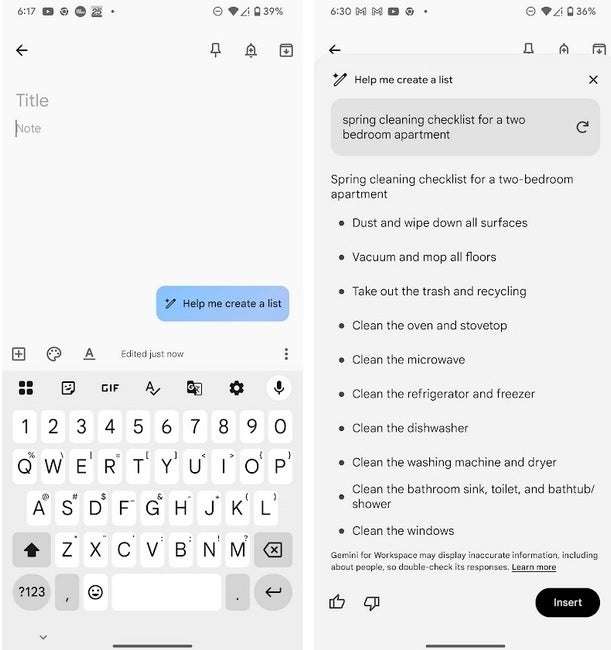
The app also features a blue prompt that allows for creating shopping lists and various other list types. Users can input their desired list topic, such as "Spring cleaning checklist for a 2 bedroom apartment," and tap the "Create" button, enabling the app to assist with crafting that list through AI. By long-pressing the corner plus button in the Keep app on your Android device, you can view a range of lists to create quickly.
The toggle option for "Create text notes by default" is available in version 5.25.102.01.90 of the Google Keep app for Android, although its rollout appears to be limited. For instance, while my Pixel 6 Pro running the latest Android 16 beta has this version of the Keep app, it has yet to receive the update.




