Apple has recently rolled out the iOS 18.4 beta 2, offering a glimpse into some exciting new features that could enhance the iPhone experience. This update brings improvements such as the newly added Visual Intelligence feature, enhancements to notification prioritization, and even new emoji options. If you're eager to discover what the latest beta has to offer, keep reading to explore all the notable features that are set to arrive in the upcoming iOS 18.4 release.
Visual Intelligence Comes to Select iPhone Models
The standout introduction in iOS 18.4 beta 2 is the Visual Intelligence feature, now available for users of the iPhone 15 Pro, iPhone 15 Pro Max, and iPhone 16e. Unlike the iPhone 16 models that incorporate the Camera Control button, this feature operates through the Action Button located above the volume controls on compatible models.
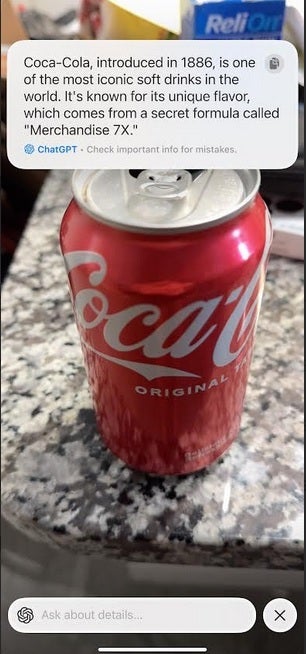
Visual Intelligence enables users to search for information on a variety of subjects, including stores, plants, and restaurants, directly from their iPhone camera. You can even ask for additional details, such as restaurant hours, menus, reservations, or orders.
How to Access Visual Intelligence
If you prefer accessing Visual Intelligence through the Lock Screen instead of the Action Button, follow these steps:
- Press the side button to enter the Lock Screen.
- Long-press on the display and tap the minus sign (-) to remove an existing Lock Screen control.
- Tap the plus sign (+) to view options and select Visual Intelligence. Finally, hit the blue "Done" button.
Once you’ve followed these steps, you'll have quick access to Visual Intelligence right from your Lock Screen.
New Features and Enhancements
The Control Center has also been updated with a new Apple Intelligence toggle, enabling quick access to Visual Intelligence by swiping downward from the right edge of the screen. Additionally, iOS 18.4 is set to introduce seven new emojis:
- Tired face with bags under the eyes
- Root vegetable
- Fingerprint
- Harp
- Tree without leaves
- Purple splatter
- Shovel
The beta version has improved the Prioritize Notifications feature, allowing you to customize notification settings on an app-by-app basis, enhancing your ability to manage important alerts.
Support for RCS Messaging
For Google Fi users, iOS 18.4 beta 2 now includes RCS Messaging support, which allows for read receipts, typing notifications, and the ability to send high-quality media even when messaging Android users.
Personal Siri in Future Updates
With new Shortcut actions included in this beta, hints about a potential "Personal Siri" feature are surfacing, suggesting Apple is working toward making Siri more integrative and responsive in upcoming updates.
If you're part of the Apple Beta Program, you can install iOS 18.4 Beta 2 by navigating to Settings > General > Software Update.




