Apple has launched iOS 18.4 beta 2, introducing an exciting feature called Visual Intelligence specifically for the iPhone 15 Pro and iPhone 15 Pro Max. This innovative capability, which was previously exclusive to the iPhone 16 series, allows users to leverage their cameras for enhanced information gathering. Whether it’s snapping a picture of an item or scanning a poster for events, Visual Intelligence seamlessly integrates with iOS, making information access intuitive and efficient.
A key highlight of this update is how Visual Intelligence has been integrated into the Action Button on the iPhone 15 Pro models. Following Apple’s move to include this feature in the recently released iPhone 16e, anticipation grew among users of the premium models. And today, that anticipation has been rewarded with the arrival of Visual Intelligence via the new beta update.
To activate Visual Intelligence, users must install the iOS 18.4 beta 2. Once updated, they can navigate to Settings > Action Button to enable Visual Intelligence by selecting its icon. A long-press on the Action Button will reveal the camera interface, allowing users to photograph or scan subjects for immediate information retrieval. Two critical icons will assist users in this process: the Ask icon, which utilizes ChatGPT for in-depth inquiries, and the Search icon, which provides Google search results.

This feature opens up a variety of uses, from accessing restaurant menus to translating text and identifying plants or animals. Whether you need a quick summary or an audible reading of text, Visual Intelligence brings a wealth of information to your fingertips.
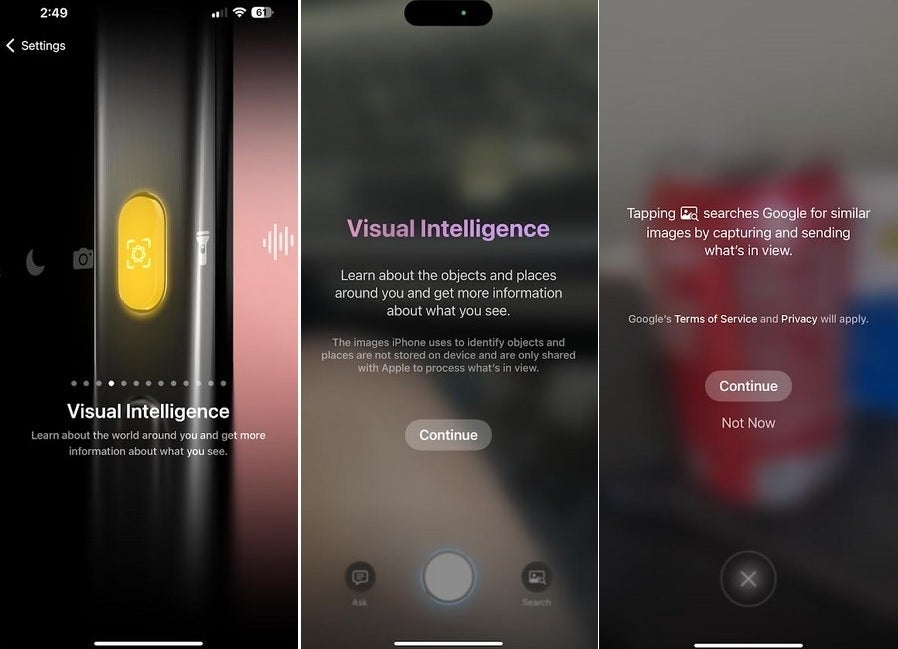
With iOS 18.4 beta 2, users of the iPhone 15 Pro and iPhone 15 Pro Max gain direct access to Visual Intelligence through the Action Button. | Image credit-PhoneArena
Some may wonder if this feature merely replicates offerings from competitors like Google Lens. However, for dedicated tech enthusiasts, new features hold significant value, and the arrival of Visual Intelligence signifies a great advancement for the iPhone 15 series.
For those participating in the iOS 18 beta program, you can activate the latest features by heading to Settings > General > Software Update to install iOS 18.4 beta 2.




