Samsung's Secure Folder is widely regarded as a reliable feature for Galaxy device users, providing a secure location for storing sensitive files, applications, videos, and images. By utilizing encryption and a passcode, it promises to safeguard private data effectively. However, recent reports suggest that this assurance may not be entirely warranted, raising significant concerns about user privacy.
A post by a Reddit user has sparked anxiety among Galaxy device owners, revealing that contents within the Secure Folder might be exposed to unauthorized access, even when the folder is locked. This alarming claim contradicts Samsung's strong emphasis on the security provided by the defense-grade Samsung Knox security platform, which is designed to encrypt data and protect it from malicious threats.
The Secure Folder aims to prevent access to images and videos within it, even when the folder is open, if an external app attempts to retrieve those files. However, this safeguard seems to fail if the requesting application is part of a work profile.
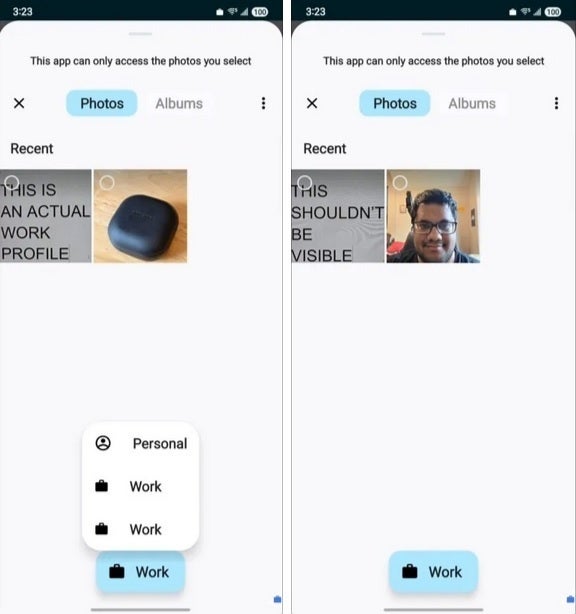
Photos and videos hidden in your Galaxy device's Secure Folder can be accessed by attackers in specific situations. | Image credit-Android Authority
In a scenario where another individual has physical access to a Samsung device, they could install a work profile app like Shelter, which could potentially allow them to access the photos and videos stored within the Secure Folder. Notably, this vulnerability appears to affect only images and videos, as other data types remain protected.
Fortunately, if your Galaxy device has a work profile established by your employer that restricts access to work files, the photos and videos within your Secure Folder could remain safe. Additionally, users can enhance security by encrypting their Secure Folder. By navigating to the Secure Folder menu and selecting the "encrypt" option, users can prevent the Android photo picker from accessing files stored there.
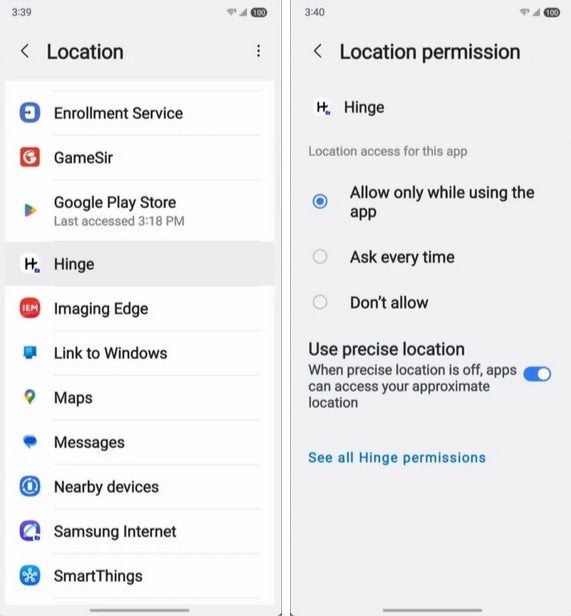
Malicious individuals can identify the apps present in your Secure Folder through the Permission Manager on your Galaxy device. | Image credit-Android Authority
Another security flaw within the Secure Folder allows anyone with malicious intent to discover which apps are stored there. By accessing Settings > Security and privacy > More privacy settings > Permission Manager and selecting a permission, individuals can view the apps installed in the Secure Folder. Tapping on the Location permission, for instance, often reveals many of these apps.
As concerns rise, there is hope that Samsung will address these vulnerabilities within the Secure Folder system to enhance user privacy. In the meantime, users should enable encryption on their Secure Folder to prevent unauthorized access to sensitive images and videos.




