The latest update from Google has brought significant changes to the user interface of the Google Messages app, most notably increasing the size of the text input field. This pill-shaped area, where users compose their messages, is now thicker and longer, creating a more spacious feel for users when typing. Additionally, the Voice memo button, located outside the text field, has also seen an increase in size. This change aims to enhance user accessibility and streamline the messaging experience.
Despite the size adjustments, all button placements remain consistent, with the plus button still located on the left inside the text field. This button opens a menu of features, which include:
- Gallery
- GIFs
- Stickers
- Files
- Location
- Contacts
- Schedule Send
- Selfie GiF
Additional features available within the text field include a smiley face emoji shortcut that directs users to the emoji keyboard. There's also a Gallery shortcut that enables users to access the camera and photo gallery simultaneously. This wider text box was introduced with the beta version 20250224_01_RC00 of the app.
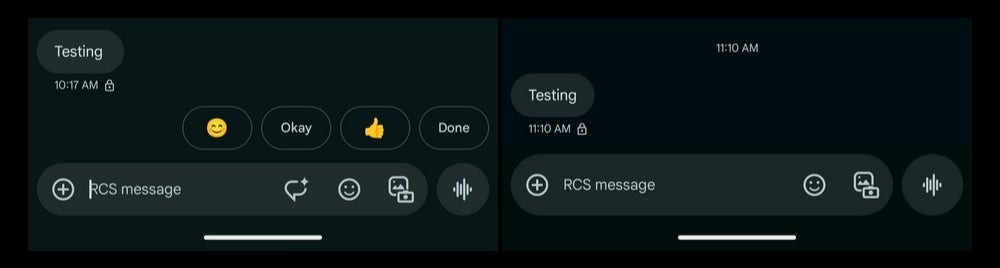
The previous version of the Google Messages text field is shown on the left, while the updated, larger text field is displayed on the right. | Image credit-9to5Google
Users interested in trying out the update can check for it by opening the Play Store app, tapping the profile icon in the upper right corner, then selecting Manage apps & device, followed by Updates available. If Messages appears in the list, an update is available. Users currently on version 20250225_01_RC00 should consider updating to experience the enhanced text field feature immediately.
The version number of the Google Messages app can be checked by navigating to Settings > Apps > See all XXX apps > Messages, where the version information can be found at the page's bottom.
If you aren't already using Google Messages on your Android phone, you can easily download it by tapping on this link, which will direct you to the Google Play Store.




