Google is rolling out an improved user interface for the "view details" feature in the Google Messages app, as revealed by recent discoveries within a beta update for Android users (messages.android_20250223_01_RC00.phone.openbeta_dynamic). This revamped feature enhances how users access information about their messages by simply long-pressing on a message in the app.
The new UI provides vital details including the date and time when a message was sent and received, the sender and recipient's phone numbers, and whether the message was exchanged over SMS (Short Message Service) or RCS (Rich Communication Services). Upon testing the updated interface, Android Authority confirmed that it introduces more comprehensive information. Users will now see the original message displayed prominently at the top of the "view details" page, complete with any emoji reactions associated with it.
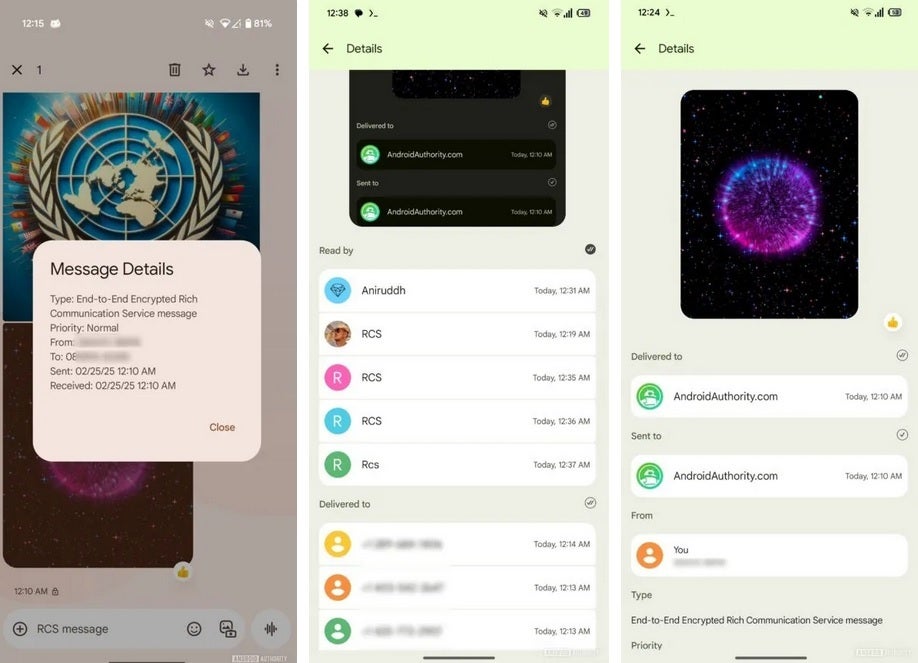
Comparison of the old and new "view details" UI in the Google Messages app. | Image credit: Android Authority
The lower section of the page will include additional information such as the names and profile pictures of both the sender and recipient. Users can check if the message has been read by examining read receipts, which indicate who has read the message. In cases where a message is a response to a previous one, this context will also be made available. From the "view details" page, tapping on a contact’s profile picture allows users to initiate calls or text messages and access profile information.
The takeaway is that the enhanced "view details" interface offers richer information, promising to boost user experience in the Google Messages app. However, while these changes are active in beta, it remains unclear when the broader Android user base will gain access to this updated feature.
If you haven't tried Google Messages on your Android device, consider downloading it from the Google Play Store. By doing so, not only will you benefit from the improved "view details" feature, but you'll also enjoy RCS support, enabling features such as read receipts, high-quality media sharing, typing indicators, and more when messaging users on iOS devices.




