In the era of smartphones, battery longevity has become a key concern for users. Long gone are the days of easily replacing removable batteries; nowadays, the health of your battery is crucial for the overall performance of your device. As part of shaping future standards, the EU's Digital Markets Act (DMA) is pushing for the return of replaceable batteries. While we wait for regulations to evolve, Google has provided new insights regarding the battery cycles of its Pixel lineup, from the Pixel 3 to the latest Pixel 9 models.
Recent developments indicate that newer Pixel models, including the Pixel 8a and beyond, showcase remarkable energy efficiency compared to their predecessors. The lithium-ion batteries, which power most smartphones, inevitably face degradation over time. Users of these newer devices can monitor the health of their batteries through performance settings. By navigating to Settings > About Phone > Battery information, users can access details such as the number of charge cycles the battery has gone through and when it was first utilized.
Not only can this information inform users about the current health of their battery, but it can also help determine whether they are still using the original battery that came with their device.
Similar trends are observable in Apple's iPhone lineup, where battery longevity continues to be a focal point.
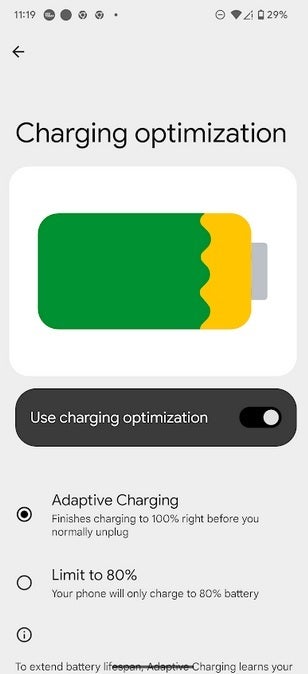
Image depicting battery optimization on a Pixel phone. | Image credit-PhoneArena
To prolong the lifespan of batteries across Pixel devices, Google offers several recommendations. Users are advised to avoid using their phones while charging and to keep them away from prolonged exposure to high temperatures (especially above 95°F/35°C). Furthermore, Google highlights the importance of enabling the Adaptive Charging feature. This useful tool learns the user’s charging habits and optimizes the battery charging speed accordingly.
With Adaptive Charging, the device slows down its charging rate and pauses at 80% full to complete the remaining charge just before the user typically disconnects it in the morning. Users can activate this function by going to Settings > Battery > Charging optimization. There, they can toggle the "Use Charging Optimization" option and choose between Adaptive Charging or stopping at 80% battery capacity.
Phone manufacturers are increasingly focused on extending the longevity of a phone's battery cycles, ensuring that users get the most out of their devices before needing replacements.




