In an exciting development for iPhone users, Apple has reintroduced a much-missed calculator function in the iOS 18.3 beta 2. Before the roll-out of the initial iOS 18 in September, users could effortlessly perform consecutive calculations by repeatedly pressing the "equals" key. For instance, multiplying 8 by 4 yields 32, and hitting "equals" again lets you multiply the result seamlessly. This feature was surprisingly removed in iOS 18, leaving many users frustrated. However, the swift return of this functionality demonstrates Apple's responsiveness to user feedback.
The Calculator app in iOS 18.3 beta 2 restores the beloved capability to perform consecutive calculations by pressing the "equals" button repeatedly. To illustrate, if you input 8 times 4, the answer is 32. Pressing "equals" again allows users to multiply the result (32) by 4, giving 128, and continuing in this manner. This restoration follows widespread outcry from users following the feature's unexpected removal in iOS 18. Media outlet 9to5Mac was among the first to spot this welcome change.
If this calculator enhancement is essential for you, and you can't wait until the stable iOS 18.3 release expected at the end of the month, consider joining the beta program. To participate, visit beta.apple.com or navigate to Settings > General > Software Update. Select Beta Updates at the top of the screen, then tap on iOS 18 Developer Beta to update to the latest beta version of iOS 18.3.
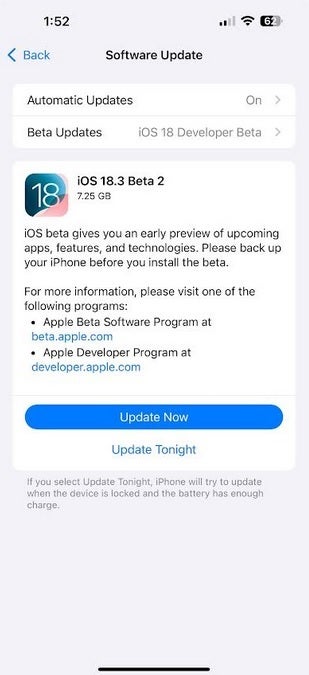
Apple's latest iOS 18.3 beta 2 features the reintroduction of a popular Calculator function. | Image credit-PhoneArena
Before enrolling in the beta program, ensure that you back up your iPhone, as beta releases may lack stability. Some functionalities may not operate correctly, and you may experience a decline in battery performance. Keep in mind that you will be unable to access stable releases until the final version of iOS 18.3 is available, at which point you can exit the beta program. Prematurely leaving the beta could result in your iPhone being wiped clean.
If your iPhone is already updated to the initial iOS 18.3 beta version, install the latest update by navigating to Settings > General > Software Update. Follow the on-screen prompts to complete the installation.




